TSTool / Command / ReadCampbellCloud
Overview
The ReadCampbellCloud command reads one or more time series from Campbell Cloud web services:
- Read a single time series by matching a TSTool time series identifier (TSID).
- Read 1+ time series using filters similar to the main TSTool window.
See the Campbell Cloud Web Services Appendix for more information about Campbell Cloud web service integration and limitations. The command is designed to utilize web service query criteria to process large numbers of time series, for example to produce real-time information products and perform historical data analysis and quality control.
See also the TSID for Campbell Cloud time series identifier command, which reads time series for a single time series.
The Data type, Data interval, and Where command parameters and input fields
are similar to those in the main TSTool interface.
However, whereas the main TSTool interface first requires a query to find the
matching time series list and interactive select to copy specific time series identifiers into the Commands area,
the ReadCampbellCloud command automates reading the time series list and the corresponding data for the time series.
Using the ReadCampbellCloud command can greatly shorten command files and simplify command logic
when processing many time series.
However, because the command can process many time series and web services are impacted by network speed,
running the command can take a while to complete.
Checks are in place to constrain queries,
for example defaulting to 30 days if the period is not specified.
Data for the location and other time series metadata,
as shown in the main TSTool interface, are set as time series properties, using web service data values.
Right-click on a time series in the TSTool Results area and then use the
Time Series Properties menu to view time series properties.
These properties can be transferred to a table with the
CopyTimeSeriesPropertiesToTable
command and processed further with other table commands.
Although TSTool can represent time series as regular interval,
where the timestamp is the interval-ending date/time (e.g., 15Minute, 1Hour),
Campbell Cloud time series are currently always treated as irregular interval with the observation at the timestamp.
If interval values are stored, TSTool treats the timestamp as interval ending.
Additional functionality may be enabled in the future as sensor variables are better understood.
Command Editor
The following dialog is used to edit the command and illustrates the syntax for the command. Two options are available for matching time series.
Match Single Time Series
The following example illustrates how to read a single time series by specifying the data type and interval (top)
and station identifier (Match Single Time Series tab).
This approach is similar to using the general
ReadTimeSeries
command but offers parameters specific to Campbell Cloud web services.
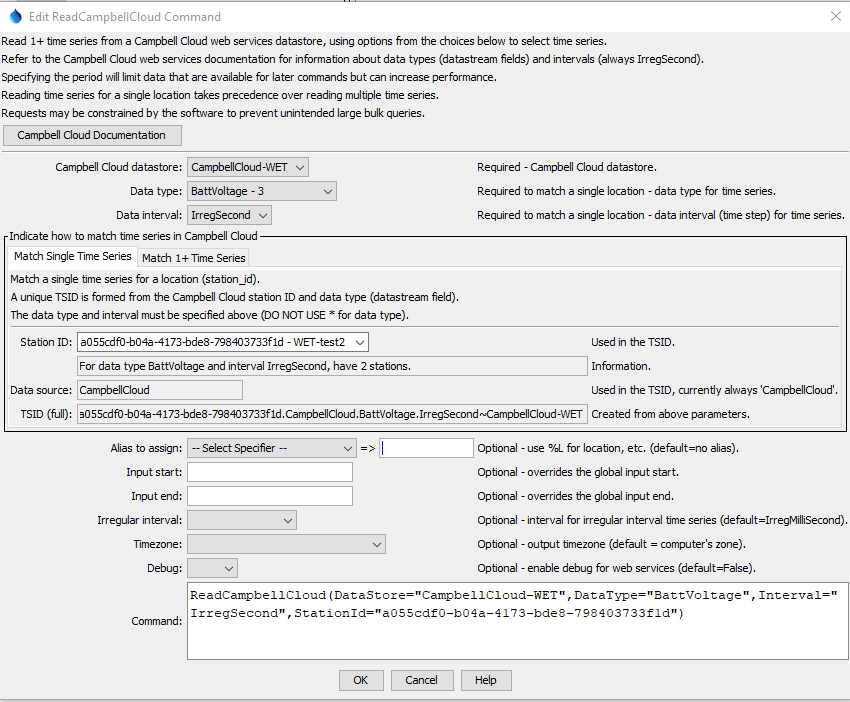
ReadCampbellCloud Command Editor to Read a Single Time Series (see also the full-size image)
Match 1+ Time Series
The following figure illustrates how to query multiple time series. For example, this can be used to process all time series of a data type in the system or all time series for a location.
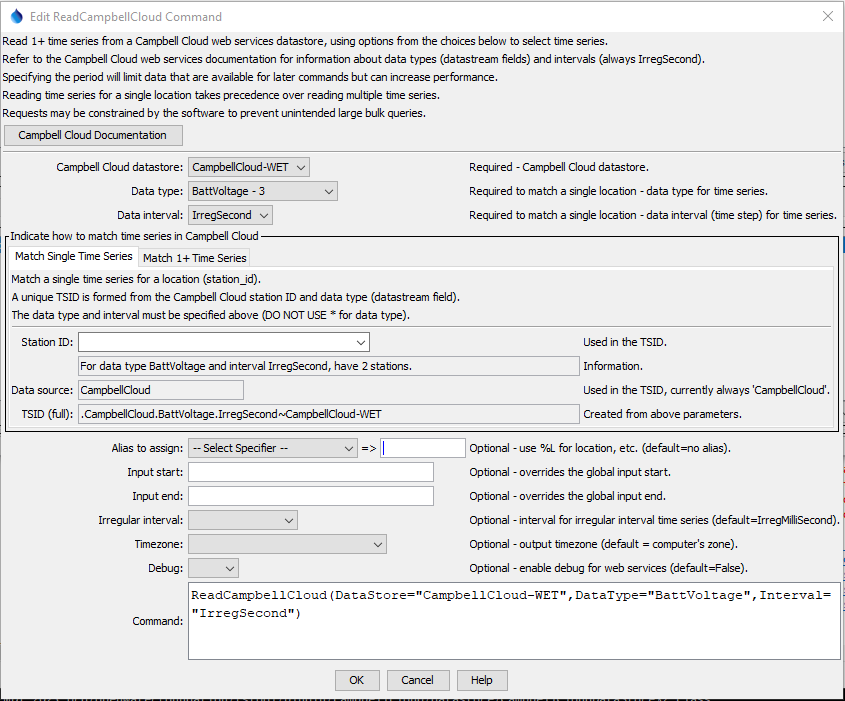
ReadCampbellCloud Command Editor to Read Multiple Time Series (see also the full-size image)
Command Syntax
The command syntax is as follows:
ReadCampbellCloud(Parameter="Value",...)
Command Parameters
| Tab | Parameter | Description | Default |
|---|---|---|---|
| All | DataStorerequired |
The Campbell Cloud datastore name to use for the web services connection, as per datastore configuration files (see the Campbell Cloud Web Services Datastore appendix). | None - must be specified. |
DataTyperequired |
The data type to be queried, corresponding to Campbell datastream field. |
* to read all the time series. |
|
Intervalrequired |
The data interval for the time series, currently always IrregSecond. The interval is currently NOT used to filter time series. |
* - to read all the time series. |
|
| Match Single Time Series | StationIdrequired |
The station identifier, corresponding to Campbell Cloud station_id. |
None - must be specified to read a single time series. |
TSID |
A view-only value that indicates the time series identifier that will result from the input parameters when a single time series is queried. | ||
| Match 1+ Time Series | WhereN |
When reading 1+ time series, the “where” clauses to be applied. The filters match the values in the Where fields in the command editor dialog and the TSTool main interface. The parameters should be named Where1, Where2, etc., with a gap resulting in the remaining items being ignored. The format of each value is:Item;Operator;ValueWhere Item indicates a data field to be filtered on, Operator is the type of constraint, and Value is the value to be checked when querying. |
If not specified, the query will not be limited and large numbers of time series may be queried. |
| All | Alias |
The alias to assign to the time series, as a literal string or using the special formatting characters listed by the command editor. The alias is a short identifier used by other commands to locate time series for processing, as an alternative to the time series identifier (TSID). |
None – alias not assigned. |
InputStart |
Start of the period to query, specified as a date/time with a precision that matches the requested data interval. The time zone will default to the computer. | Read most recent 30 days of data. | |
InputEnd |
End of the period to query, specified as a date/time with a precision that matches the requested data interval. | Read most recent 3 months of data. The time zone will default to the computer. | |
IrregularInterval |
Used with regular interval time series in cases where an interval is not yet supported (e.g., month and year) or there are data complexities, such as daily interval time series that do not align with midnight. The resulting time series will have irregular interval (spacing) and date/time precision will match the interval (e.g., IrregHour will use hourly time precision). The parameter can have one of the following values. High precision time is typically only used in special cases.
|
IrregSecond |
|
Timezone |
Time zone for InputStart and InputEnd and output time series. The Campbell Cloud UTC times will be converted to the requested time zone. |
Output will use the local time zone for the computer. | |
Debug |
Used for troubleshooting: False or True. |
False |
Examples
See the automated tests.
Troubleshooting
Refer to the TSTool log file. Use the
SetDebugLevel command
to increase the amount of output for debugging.
See Also
CopyTimeSeriesPropertiesToTablecommandReadTimeSeriescommand- TSID for Campbell Cloud command
WebGetcommand