TSTool / Datastore Reference / Campbell Cloud Web Services
- Overview
- Standard Time Series Properties
- Other Specifications and Integration Considerations
- Limitations
- Datastore Configuration File
- See Also
Overview
The Campbell Cloud web services allow queries by software, including web applications and analysis tools such as TSTool. TSTool accesses Campbell Cloud web services using the Campbell Cloud plugin. Campbell Cloud data are particularly useful for real-time operations. However, long-term archival data may not be available.
See the following documentation:
- Campbell Cloud Getting Started Guide.
- Campbell Cloud API documentation.
- Install Campbell Cloud Plugin appendix
- Campbell Cloud TSID command
ReadCampbellCloudcommand
TSTool primarily uses the following Campbell Cloud web services:
Campbell Cloud Web Services Used by the TSTool Plugin
| Service | Comments |
|---|---|
assets |
Read station metadata. |
datastreams |
Read datastream (time series) metadata. |
datastreams/.../datapoints |
Read datastream (time series) data. |
stations |
Read station metadata. |
tokens |
Read an API token given the datastore configuration file authentication properties. |
The Campbell Cloud API has limitations such as a timeout associated with a token. Requesting data after the timeout will return an error. The TSTool plugin automatically detects the timeout and requests a new token. To improve performance, Campbell Cloud objects including assets, datastreams, and stations are read when TSTool starts and when the token needs to be refreshed. Time series data are records are not cached. If metadata are changed, restart TSTool. This approach provides good performance on systems that have stable configurations.
The TSTool WebGet
command can be used to retrieve data from any web service and save to a file.
For example, a JSON format file can be saved and the resulting file can be read using commands such as
NewObject.
These general commands provide flexibility to retrieve data in addition to the specific Campbell Cloud datastore commands.
See the SetPropertyFromDataStore
command (available in TSTool 14.7.0) to set a processor property from the ApiToken datastore property
so that the token can be used in WebGet commands without hard-coding the token.
Web Service to Time Series Mapping
Time series data objects in TSTool consist of various properties such as location identifier, data type, units, and data arrays containing data values. To convert Campbell Cloud data to time series requires joining Campbell Cloud station, asset, and datastream metadata, and datastream datapoints for time series values.
The TSTool main interface browsing tool displays joined information in the time series list to select time series. A catalog of unique time series is created from metadata and is used to provide user choices. The Data type and Time step are general filters implemented for all datastores and the Where input filters are specific to Campbell Cloud.
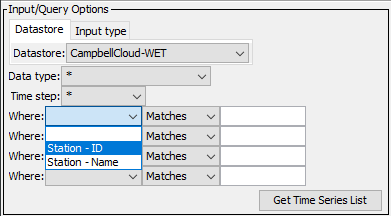
TSTool Where Filters
Standard Time Series Properties
The general form of time series identifier used by TSTool is:
LocationID.DataSource.DataType.Interval~DatastoreName
The standard time series identifier format for Campbell Cloud web service time series is as follows (the station identifier has been obfuscated).
xxxxxxxx-xxxx-xxxx-xxxx-xxxxxxxxxxxx.CampbellCloud.BattVoltage.IrregSecond~CampbellCloud-WET
The meaning of the TSID parts is as follows:
- The
LocationIdis set to:- Campbell Cloud station identifier (
station_idin JSON). This is a unique identifier for the entire Campbell Cloud and there does not appear to be a shorder idenntifier avaialable (although it may be possible to use a subset of the identifier).
- Campbell Cloud station identifier (
- The
DataSourceis set to:CampbellCloudalways, not necessary to query the time series.- It may be possible to use the organization name,
but the
organizationsAPI endpoint does not seem to be accessible.
- The
DataTypeis set to:- Campbell Cloud
datastreamsmetadatafieldvalue. - If there are multiple sensors with the same
fieldfor the station, the software will need to be enhanced to ensure that the time series identifier is unique. See the Troubleshooting documentation for information about dealing with duplicate time series identifiers.
- Campbell Cloud
- The
Intervalis set to:IrregSecondin all cases.- Regular intervals may be supported in the future but require data that is not returned by the API.
- See more information in the Data Interval Handling section.
- The
DatastoreNameis taken from the datastore configuration fileNameproperty:- The datastore name is listed in the TSTool main interface.
- Multiple datastores can be configured, each pointing to a different Campbell Cloud web services
(e.g., if multiple versions are available) and organization account.
Therefore, datastore names should be assigned with enough detail to avoid confusion.
The following are typical examples:
CampbellCloud- general, if only one datasture will be configuredCampbellCloud-Demo- the Campbell Cloud demonstration accountCampbellCloud-Org- for a specific organization
Important standard time series properties include:
- Time Series Description:
- The Campbell Cloud station name is used for the time series description, followed by a dash, and the datastream field name. The time series description is used in graph legends.
- Data Units:
- The Campbell Cloud datastream metadata do not include sensor units. The units will need to be assigned to the time series using other data.
- Missing Data Value:
- The special value
NaNis used internally for the missing data value and is used when web service data values are reported asnull. - It does not appear that Campbell Cloud allows null values.
- The special value
- Campbell Cloud Properties:
- Other Campbell Cloud properties are set as time series general properties.
See the next section for additional mapping of Campbell Cloud data to TSTool time series.
Other Specifications and Integration Considerations
The following are other specifications related to TSTool plugin integration with Campbell Cloud web services.
- Service URL:
- The configuration file
ServiceRootUrlproperty includes everything except specific service query parameters. This provides flexibility if the URL changes between TSTool software releases. See the Datastore Configuration File section for an example.
- The configuration file
- Data Caching:
- TSTool performance, in particular interactive features, is impacted by web service query times. Therefore, it is desirable to cache data in memory so that software does not need to requery web services. The trade-off is that when data are cached, changes in the Campbell Cloud system will not be visible in the TSTool session unless TSTool rereads the data. There is a balance between performance and having access to the most recent data.
- Currently, the TSTool plugin caches the asset, datastream, and station objects, and the time series catalog objects that join these objects. The catalog is used to determine unique lists of choices used in the user interface.
- Response Limits (Data Throttling):
- Campbell Cloud may throttle requests or enable access to more data and system features. Time series data points have a limit of 1500 points. If the requested period returns more than 1500 points multiple requests will occur.
- Time zone:
- See the Timezone Handling section below.
- Timestamp and Data Interval:
- Currently, TSTool handles all time series as irregular interval with default
IrregSecondinterval. - Times are saved to millisecond precision.
- Future enhancements may enable more options for handling regular interval time series.
- See the Data Interval Handling section for more information.
- Currently, TSTool handles all time series as irregular interval with default
- Observations:
- Campbell Cloud does not store a data flag for values.
- If duplicate values are encountered at the same time, the last value encountered is saved in the time series.
Timezone Handling
The following are features of Campbell Cloud related to timezone:
- Campbell Cloud internally stores data in UTC and web service times and query parameters use UTC by default.
- Web service API query parameters such as time series period use Epoch milliseconds (refer to the API documentation).
- The station local time zone does not appear to be saved consistently in Campbell cloud, but it may be possible to configure this metadata and automatically convert UTC data to station timezone. Currently the TSTool plugin does not use this value.
- Using an output timezone that uses daylight saving time will result in a one hour when no data exist (because time skips forward by an hour) and one hour each year when duplicate values exist (because time skips back by one hour). These discontinuties are not present in the UTC timeline, which does not use daylight saving, but will be present if local time are used during input and output.
TSTool is able to handle various timezone representations for the date/times used with the time series period of record and individual time series values. No (empty) timezone is also allowed, which implies that the timezone is not important (e.g., for date) or is consistent (for date/time). Constantly checking date/times for timezone compatibility in each command is a complication that is often ignored. In most cases, the data for a workflow will have constant timezone because all data are local. However, it is always best if the workflow clearly enforces consistent timezone.
The SetInputPeriod command
and ReadCampbellCloud
InputStart, InputEnd, and Timezone command parameters set the input (read) period.
The timezone is handled as follows:
- Timezones used in date/times in command parameters should use the timezone name (e.g.,
America/DenverorUTC), not UTC offset format (e.g.,+06:00). This allows daylight saving time to be properly handled throughout the year and period of record. See the "List of tz database time zones" on Wikipedia "TZ Identifier" for a list of recognized timezones. - If the timezone is not specified in the input period,
the Campbell Cloud
TSIDandReadCampbellCloudcommands will use the computer's timezone. This allows the current time to be used effectively. - If a timezone is specified in the period or the
ReadCampbellCloudcommandTimezoneparameter, it will be used to determine the time and will be converted to UTC for API requests. - The time timezone used with the input period is used to determine the Epoch milliseconds, which are used to query Campbell Cloud time series data.
- The
Timezoneparameter for theReadCampbellCloudcommand can be used to specify the output time zone (default is UTC). Currently the output time zone is not automatically determined from station or other timezone in Campbell Cloud.
Data Interval Handling
Campbell Cloud data measurement intervals and timestamps vary depending on the station configuration and sensors that are used.
For example, the following illustrate Campbell Aspen 10 station battery voltage (BattVoltage) data for several stations.
Note that the graph appears to show a 10-minute interval for data, which are instantaneous samples.
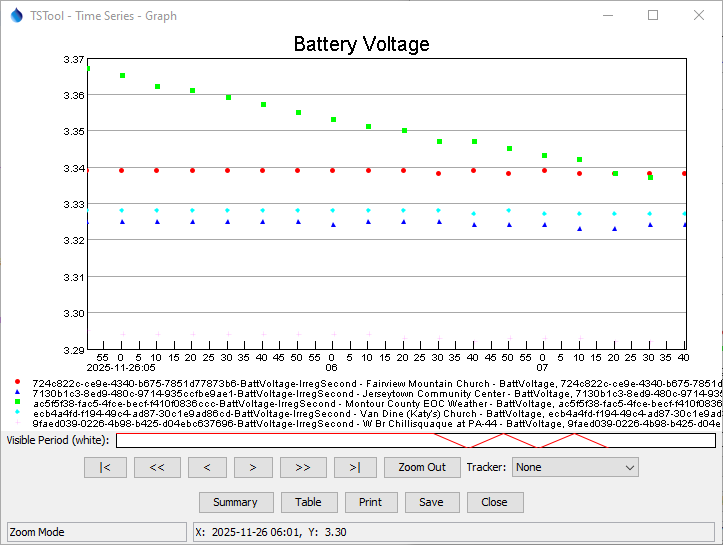
TSTool Graph for Battery Voltage Data (see full-size image)
However, a closer examination of the tabular data shows that the timestamps for each value have regular 10-minute spacing, but the second and sub-second values are not zero, as shown in the following table.
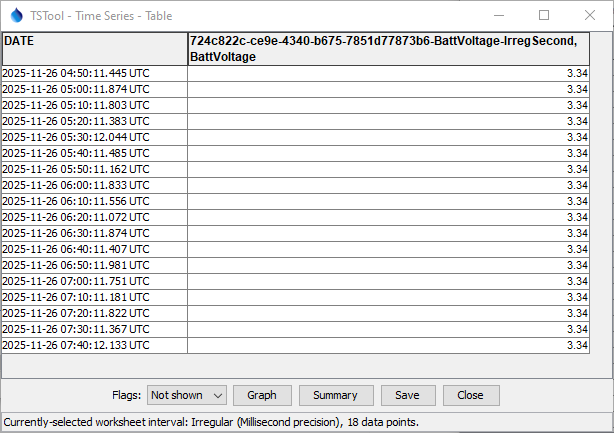
TSTool Table for Battery Voltage Data (see full-size image)
The following graph illustrates Aspen 10 accumulated precipitation (TotalAccumulation) for several stations.
Note that the graph appears to show a 5-minute interval for data, which are total accumulation as of the timestamp.
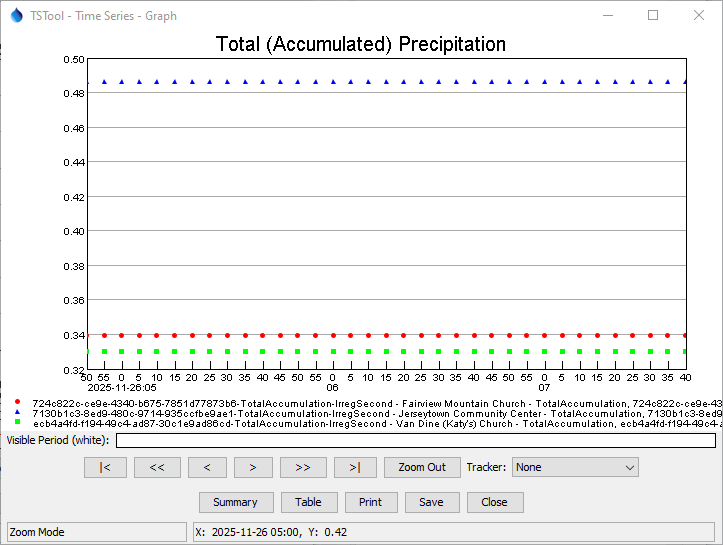
TSTool Graph for Accumulated Precitation Data (see full-size image)
A closer examination of the tabular data as shown in the image below confirms that the timestamps for each value have regular 5-minute spacing, and the second and sub-second values are zero, which is indicative of a computed value.
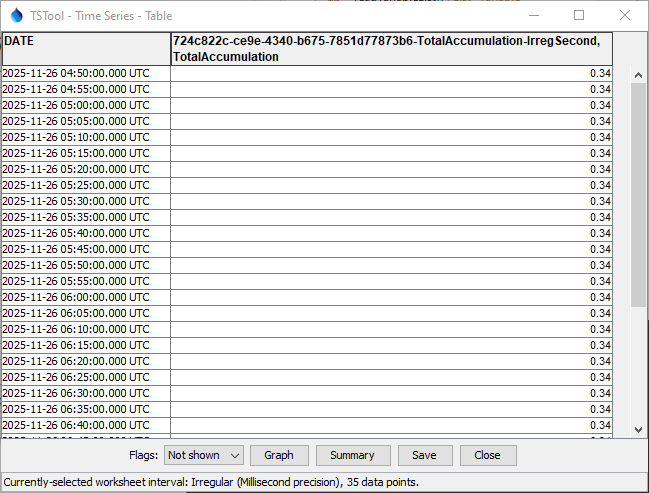
TSTool Table for a Accumulated Precipitation Data (see full-size image)
The following are behaviors that have been observed using Campbell Aspen 10 stations with different sensors:
- ClimaVUE:
- 5-minute accumulated precipitation values are returned as
single-interval totals (
Rain) or tip counts (Tips). There is noTotalAccumulationdatastream field. - Other data are measured as either average values over
the 5-minute interval (e.g.
AirTemp,BP,RH,Solar,WindDir,WindSpd), maximum value in the 5-minute interval (e.g.,WindSpdMax), or instantaneous value (e.g.,BattVoltage)
- 5-minute accumulated precipitation values are returned as
single-interval totals (
- RainVUE:
- 5-minute accumulated precipitation values are returned as
single-interval totals (
Rain) and accumulated totals (TotalAccumulation). - It is unclear whether the accumulated values every roll over to zero.
- 5-minute accumulated precipitation values are returned as
single-interval totals (
- RangeVUE:
- 10-minute or less frequent measurements may occur because the sensor requires more power.
- Changing conditions may trigger more frequent measurements.
The "observation mode" of the station may be turned on, for example during maintenance. In this mode, the data interval is 10 seconds. Consequently, more data values may be reported until observation mode is disabled. The resulting data will therefore not align with normal 5-minute (or longer interval depending on sensor). This is one reason why the plugin treats all data as irregular interval.
Based on the above, the TSTool Campbell Cloud plugin treats all data as irregular interval time series:
- instantaneous measurements will correspond to the timestamp
- calculated interval data have a timestamp that corresponds to the end of the interval
Consuming software can be configured to store the data as regular interval data (e.g., 5-minute rain total). However, complications such as observation mode may result in data values that do not align with the normal data interval.
Because the Campbell Cloud data interval is generally 5-minutes, which is a relatively short time, average values can be treated as instantaneous, and precipitation totals can be added for larger interval totals (considering the end of interval time boundaries). This will result in a slight loss of accuracy when representing actual conditions. However, averaging a sample of values in a short interval also minimizes the impacts of extreme values that may not be representative.
Limitations
The following limitations and design issues have been identified during development of the Campbell Cloud plugin. Additional software development is required to overcome these limitations. However, some issues require changes to Campbell Cloud.
- Unique time series identifier:
- TSTool currently uses a combination of station ID and datastream field to uniquely identify time series. It may be necessary to also consider other metadata for uniqueness.
- The data interval in the TSID is not currently used to uniquely identify the time series in Campbell Cloud and defaults to
IrregSecond. - The station ID used in the TSID is long and not human-friendly. An alternative "alias", for example using the organization and shorter ID would be useful. Implementing this only in the TSTool plugin is possible, but an identifier that is integrated with Campbell Cloud would be better.
- Time period:
- The Campbell Cloud web services requires that the start and end are specified for
datastream/.../datapointsrequests. Because queries of full historical period may result in slow performance, TSTool defaults the period to the most recent 30 days. - It is not clear whether Campbell Cloud will archive data indefinitely and whether long periods of record will significantly degrade performance.
- The Campbell Cloud web services requires that the start and end are specified for
- Regular interval time series:
- Regular interval time series are currently not handled by the TSTool Campbell Cloud plugin due to "observation mode" records and other changes in interval that may occur (e.g., regular reports that are supplemented by event-driven data reports that are more frequent than regular reports).
- Consuming software must know how to handled data,
such as adding
TotalAccumulationprecipitation values over a longer interval.
- Data flags:
- Data flags do not appear to be available from Campbell Cloud web services, for example to indicate data quality. Flags can be handled by TSTool if available.
- Data units:
- It does not appear to be possible to determine datastream data units from the API. Consequently, data units must be set in consuming software based on knowledge of the sensor characteristics.
- The data units for different sensors may vary such as ClimaVUE and RainVUE using different units for precipitation.
- ClimaVUE precipitation:
- The ClimaVUE station configuration for Aspen 10 provides interval precipitation tip count and precipitation.
However, unlike the RainVUE station configuration, the
TotalAccumulationdatastream field is not available. Consequently, precipitation data are less certain because a gap in precipitation may correspond to zero or non-zero precipitation. The ability to measureTotalAccumulationon ClimaVUE stations is a useful enhancement.
- The ClimaVUE station configuration for Aspen 10 provides interval precipitation tip count and precipitation.
However, unlike the RainVUE station configuration, the
- Data Gaps:
- The Aspen 10 units may experience data gaps due various reasons including missing measurements at the unit or inability to transmit to Campbell Cloud. These gaps may be due to various reasons such as low battery voltage. If the unit has collected data but is unable to transmit, the queued measurements should be transmitted to Campbell Cloud when communications are available.
- The RangeView station configuration appears to have more issues due to larger power demands and fine-tuning the frequency of measurements and transmissions may need to occur.
- Data gaps in systems that consume Campbell Cloud data can be minimized by requesting a longer period of Campbell Cloud data for upload to another system. However, the longer the period, the higher the computation load on each system. Different query periods can be implemented for different station types.
- Manual population of data, for example running a TSTool workflow for a historical period to download data, may be necessary to correct data gaps.
- The balance of automated and manual processing should be evaluated for each system because Aspen 10 and other hardware will behave differently in different environments.
Datastore Configuration File
A datastore is configured by creating a datastore configuration file.
Create a user datastore configuration file .tstool/NN/datastores/CampbellCloud.cfg (or similar) in the user's files,
for example by copying and modifying the following example, or copying from another installation.
The NN should agree with the major TSTool version, for example 15 as shown by the Help / About TSTool menu.
TSTool will attempt to open datastores for all enabled configuration files.
The following illustrates the CampbellCloudDataStore datastore configuration file format
and configures a datastore named CampbellCloud-Demo.
The Name property is the datastore name that will be used by the TSTool - the file name can be any name
but is often the same as the Name with extension .cfg.
# Configuration information for the Campbell CLoud web service datastore.
# Properties are:
#
# Enabled - indicates if the datastore is enabled (active)
# ServiceApiDocumentationURL - URL for online API documentation
# Type - must be CampbellCloudDataStore to find proper software
#
# The user will see the following when interacting with the data store:
#
# Name - data store identifier used in applications, for example as the
#     input type information for time series identifiers (usually a short string)
# Description - data store description for reports and user interfaces (short phrase)
# ServiceRootURL - web service root URL, including the server name and root path

Enabled = True
#Enabled = False
Type = "CampbellCloudDataStore"
Name = "CampbellCloud-Demo"
Description = "Campbell Cloud web services for demo account"
ServiceRootUrl = "https://iot.campbell-cloud.com/api/v1"
ServiceApiDocumentationUrl = "https://docs.campbellcloud.io/api/"
OrganizationId = "867e3a14-7614-47a2-a5fa-73e831cfc170"
UserName = "demo@campbell-cloud.com"
Password = "c^T9m4A4*!tyPu9q"
Debug = True
Cambell Cloud Web Services Datastore Configuration File
The following table describes configuration file properties.
See the Campbell Cloud Getting Started Guide
and create-token
service documentation
for information about generating the API token.
Campbell Cloud Web Services Datastore Configuration File Properties
| Property | Description | Default |
|---|---|---|
Descriptionrequired |
Description of the datastore, typically a short sentence, used in some displays. | None - must be specified. |
Enabled |
Indicates whether the datastore is enabled. | True |
Namerequired |
Datastore name that is used in the TSTool software and Campbell Cloud commands. The name should be unique across all datastores. | None - must be specified. |
OrganizationIdrequired |
The organization ID for the Campbell Cloud account. | None - must be specified. |
Passwordrequired |
The Campbell Cloud account password. | None - must be specified. |
ServiceApiDocumentationUrl |
The URL for the web services API documentation, specific to the system. This is used by software to display system-specific documentation. | Documentation will not be available from command editors. |
ServiceRootUrlrequired |
The root URL for the web services. This should include everything except the service name and query parameters (the specific service name and query parameters are automatically specified by software to query data). A trailing slash will be added if not included. | None - must be specified. |
Typerequired |
Must be CampbellCloudDataStore, which is used by TSTool to identify which plugin software to use for the datastore. |
None - must be specified. |
UserNamerequired |
The Campbell Cloud account user name. | None - must be specified. |
See Also
- Campbell Cloud TSID command
ReadDelimitedFilecommandReadCampbellCloudcommandReadTableFromDelimitedFilecommandReadTableFromJSONcommandSetInputPeriodcommandWebGetcommand